Collect the documents
of a case,
step by step.
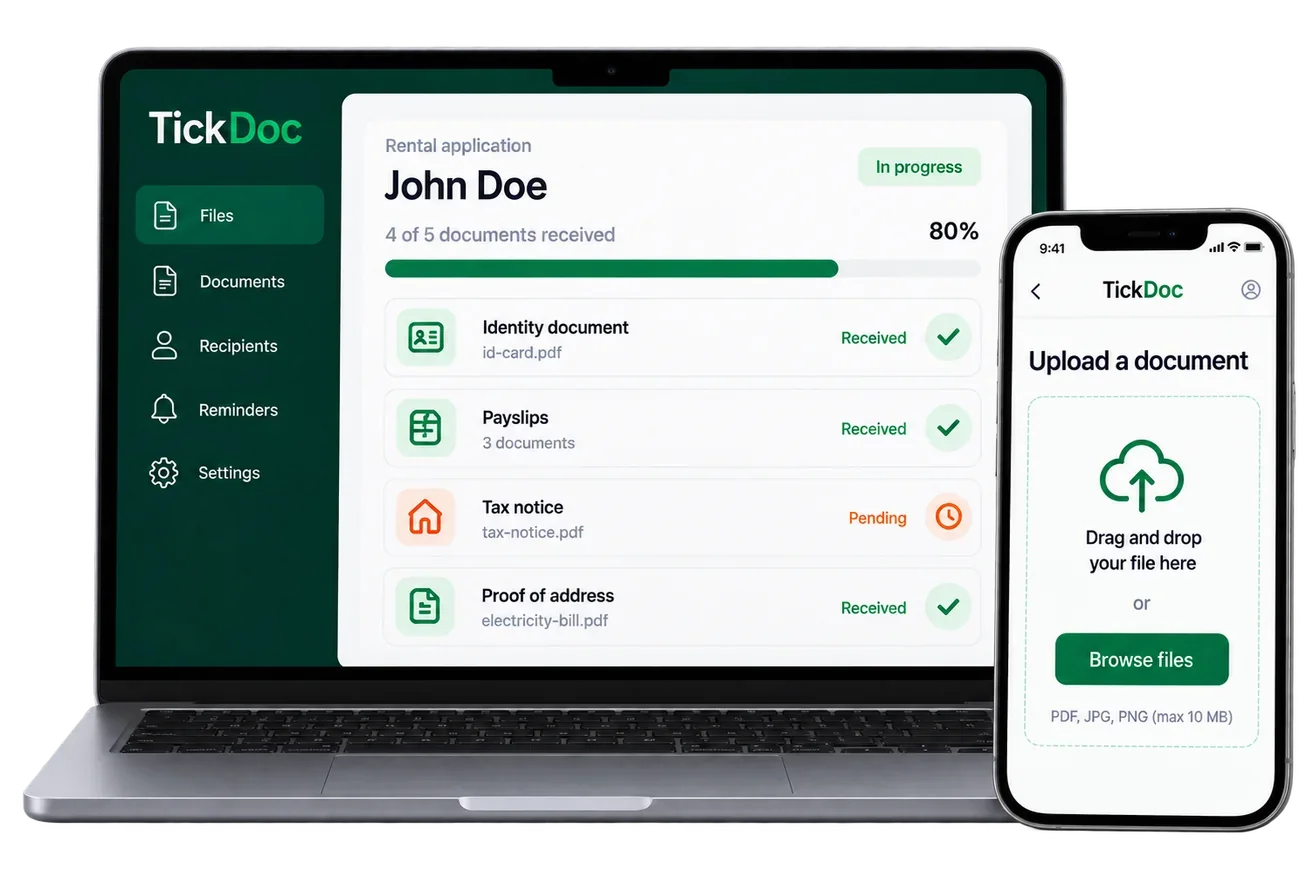
You choose the documents you want to receive, you send a link to your client, and you follow the uploads from TickDoc. Your client uploads with no account to create, and you see what is still missing.
- 1You prepare the checklist
- 2Your client receives a secure link
- 3You follow progress as it happens
- 4You review and collect the case
- No commitment and no bank card
-
 Hosted in France
- Encrypted per case

From the request to the complete case, in four steps.
A simple, efficient process, for you and for your clients.
Prepare the checklist
Choose the documents and the information you want to ask for. Reusable checklists, included depending on the plan, save you from starting over on every case.
Send the link
Your client receives a secure link and uploads their documents from a phone or a computer, with no account to create.
Follow and chase
You see what has arrived, what is missing and what needs correcting. The reminders you have set go out on their own.
Review and collect
Accept the documents that are right, turn down those that must be replaced, then collect the case and its summary.

Your client uploads. You keep track.
Your client sees only what they need. On your side, you follow the whole case.
What your client sees
One page, one link, no sign-up.
- A link that just opens. Received by email, opened in one gesture.
- No account to create. No password, no sign-up, no charge.
- Uploading across several sittings. They upload what they have, come back the next day.
- A way to explain something missing. A message goes with the document they do not have.
They have access neither to your workspace nor to any other case. They can never read back, download or preview what they uploaded: only replace it.
What you see on your side
A dashboard that sorts and counts.
- How far each case has got. How many documents are handled, and by whom.
- What has arrived and what is awaited. Document by document.
- Automatic reminders. At the delays you set, or none at all.
- A clean, usable export. An archive, a summary, an access log.
Nine filters each announce how many cases they hold: to review, in progress, overdue, drafts, closed, archived.
TickDoc handles the details that eat your time.
You keep your hands on the case, without sorting it all again at every message.
Checklists that adapt
The documents asked for change with the answers given. “Owner or tenant?” decides whether a property tax notice or a rent receipt is needed, and you avoid asking for documents nobody needs.
Several sittings
No account to create, and the same link stays valid: your client uploads what they have, closes the page, and comes back to finish the case without starting over.
Twelve payslips fit in one field, not twelve boxes to tick.
Several recipients
A flatmate, a partner, a guarantor or a co-borrower all contribute to the same case, each through their own link, and neither sees what the other uploaded.
Automatic reminders
Reminders go out at the delays you set: seven days before the due date, then the day before last, for instance. Leave it empty to chase nobody.
Turning a document down, with a reason
“The photograph is cut off at the bottom.” The reason goes to your client, that one document reopens, and the rest of the case does not move.
Archive and summary
A ZIP archive with proper names, a summary PDF that lists every document and its state, and an access log you can export as CSV.
Built for real cases, not for a perfect demonstration.
The details that make the difference day to day.
Reusable checklists
A checklist written once is used again. An existing case can be duplicated, or turned into a template.
A document that is missing
Your client explains in writing the document they do not have, and moves on. They are never stuck, and you know why.
Versions
A replaced document stays attached to the same need. The previous version is kept, and is restored in one click.
Notifications
On every upload, grouped, one summary a day, or only at closing. You follow progress without checking each case by hand.
And if you work as a team?
Three ways to share a case, and none of them is implicit. Teams and internal sharing depend on the plan.
Three roles
Owner, colleague, reader. All three see the same cases; what differs is what they can do, and a reader is not shown a button that fails.
Teams
Lending, Lettings, Management. Members see the cases of their team, including those they did not create. They can neither delete them nor move them elsewhere.
Sharing with one named person
To open one particular case to one particular colleague. The gesture is explicit, it appears in the log, and it can be withdrawn. The person cannot pass it on.
Five questions, before you try.
Does my client have to create an account?
No. They receive a link, they open it, they upload. No password, no sign-up, no charge. The link can be revoked at any moment, including on a session that is already open. The detail is on the security page.
Can they upload their documents across several sittings?
Yes. They upload what they have, close the page, and come back later with the same link. The link stays valid until the due date you set, or until you revoke it.
What happens if a document is not right?
You turn it down with a reason, which goes to your client. That one document reopens, the rest of the case does not move, and the new file becomes a version: the previous one is kept and is restored in one click.
What happens if a document is missing?
Your client explains in writing why it is missing, and moves on. They are never stuck by a document they do not have: an explained absence counts as handled, it appears in your summary, and you decide what to do next.
Can I ask several people for documents in the same case?
Yes. Each person receives their own link, and a document can be asked of every one of them or once for the whole case. Nobody sees what the others uploaded.
Try TickDoc on your next case.
Create your checklist, send the link and see exactly what your client sees.
See the pricing- No bank card
- No commitment
- Hosted in France